
marketing Jun 4, 2026
Content Design Principles - Ultimate Beginner’s Guide

Content design principles are the foundation of creating content that is clear, useful, and easy for users to act on. They guide how information is written, structured, and presented so people can quickly understand it and complete their tasks without confusion. But in reality, many businesses struggle with content that feels cluttered, inconsistent, or hard to follow. This often leads to poor user experience, low engagement, and missed opportunities. That is where the right approach to content design makes a real difference. By focusing on clarity, structure, and user needs, you can turn complex ideas into simple, meaningful experiences. This is exactly what Brief Cab specializes in. They help brands transform scattered information into powerful, visually engaging content that connects and converts. If you want your content to not just inform but truly engage and drive results, it is time to rethink your approach. Get in touch with Brief Cab today and start creating content that speaks, persuades, and delivers real impact.
What is the definition of Content Design Principles?
Content design principles are guidelines that help you create content that is clear, useful, accurate, and easy to understand. They guide how you write, structure, and present information so users can find what they need and take action without confusion.
Good content design is not just about choosing the right words. It is about understanding the user’s needs, context, and goal. For example, if someone is renewing a passport, they need clear steps, simple language, and helpful links at the right time.
The main content design principles include clarity, accuracy, context, transparency, inclusivity, findability, and helpfulness. Together, they make content more trustworthy and user-friendly.
In simple terms, content design principles help you communicate in a way that feels human, practical, and easy for your audience to follow.
Why Content Design Principles Matter?
Content design principles matter because they help turn information into something people can actually understand and use. Without them, even well-written content can feel confusing, overwhelming, or disconnected from what the user really needs.
When content is designed with the user in mind, it becomes easier to navigate, trust, and act on. For example, clear language reduces confusion, while accurate and transparent information builds credibility. Context ensures that users get the right information at the right time, which makes their experience smoother and more meaningful.
Here is why content design principles are so important:
-
They improve clarity, so users can quickly understand the message
-
They build trust through accurate and transparent information
-
They reduce frustration by providing logical structure and flow
-
They make content more accessible and inclusive for a wider audience
-
They help users complete tasks faster, whether it is signing up, buying, or learning
-
They support business goals by increasing engagement and conversions
 What Are The Main Content Design Principles?
The main content design principles help you make content clear, useful, and easy to act on.
But this does not stop at words.
Your content also needs the right layout, flow, and visual order. Think of a web page. A user sees the first screen and decides fast.
-Do they get your offer?
-Do they know what to do next?
-Do they trust you enough to scroll?
That is where content design and visual design work as a team.
Here are the key content design principles:
• Clarity means your message feels clear at first look
• Accuracy means your facts stay correct and useful
• Context means users see the right message at the right time
• Transparency means you stay honest about what you offer
• Cohesiveness means your tone, layout, and flow feel the same
• Inclusivity means more people can understand and use your content
• Findability means users can spot key details fast
• Helpfulness means your content helps users take the next step
For example, a hero section with five vague lines can lose users fast.
A clear first screen can work much better:
• One strong headline
• One short subtext
• One clear CTA
• One visual that supports the message
That is content design in action.
 How To Make Content Findable
Content can be made findable by helping users easily discover the information they are looking for without confusion or extra effort.
Match Content To User Search Intent
To improve findability, start by understanding what users are actually searching for. Think about the words they use, the questions they ask, and the problems they want to solve.
Align your content with this intent by using familiar language and addressing real user needs. This ensures your content appears relevant both in search engines and on your platform.
Use Clear Headings And Metadata
Headings and metadata act like signposts that guide users and search engines. Use descriptive headings that clearly explain what each section is about.
Page titles and descriptions should also be meaningful and easy to understand, even when seen out of context in search results. This helps users quickly decide if your content is what they need.
Create Multiple Paths To Key Information
Not all users navigate the same way, so it is important to provide multiple ways to reach important content. This can include internal links, navigation menus, and related content sections.
By offering different paths, you reduce the chances of users getting lost and make your content more accessible and user-friendly.
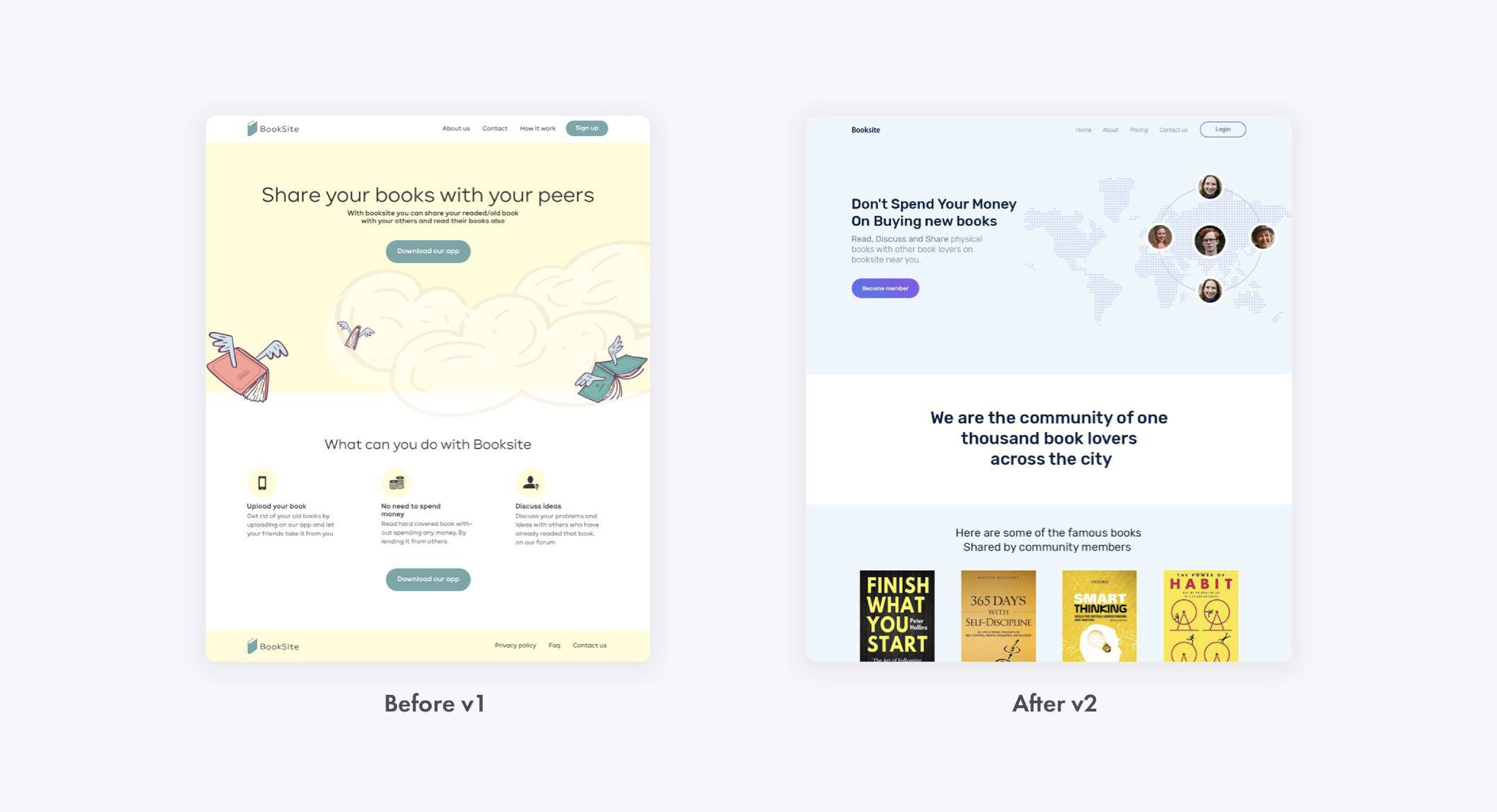 How To Make Content Clear
Clear content helps users understand your message fast and move ahead with trust.
On a web page, clarity starts at the first glance.
Your headline, visual, and CTA should tell users three things:
• What you offer
• Why it matters
• What they should do next
Write In Plain Language
Use words people say in real life.
A simple line often works better than a clever one.
For example, this feels vague:
• We create digital growth solutions for modern brands
This feels clearer:
• We design websites that help brands get more leads
See the shift?
The second line tells users what you do and why it helps.
Remove Jargon And Ambiguous Terms
Big words can make a page feel smart, but they can also slow people down.
Your user should not pause to decode your message.
For example, a button that says “Explore solutions” can feel unclear.
A better CTA can say:
• Book a free call
• View our work
• Start your project
Each one tells the user what happens next.
That small change can make the page feel easier and more direct.
Use Structure To Reduce Cognitive Load
A clean layout helps users scan without stress.
Think of a service page.
If you place all details in one long block, users may skip it. But if you break it into small parts, the page feels easy.
Use a simple flow like this:
• Problem
• Your approach
• Visual proof
• Result
• CTA
This helps the user move from doubt to action.
How To Make Content Human
Human content feels thoughtful, supportive, and designed for real people in real situations.
Design For Stress And Real-Life Needs
Users are not always calm or focused. They might be in a hurry, stressed, or unsure of what to do next. Good content design takes this into account by keeping instructions simple, reducing unnecessary steps, and avoiding overwhelming information.
When content respects the user’s time and mental state, it becomes much easier to use.
Use Inclusive And Accessible Language
Human content is inclusive and welcoming to everyone. This means using language that is easy to understand, free from bias, and respectful of different backgrounds, abilities, and identities.
Avoid assumptions and write in a way that works for a wide range of users, including those with different literacy levels or accessibility needs.
Guide Users To The Next Step
Clear guidance is a key part of human-centered content. Do not leave users wondering what to do next. Provide helpful prompts, clear calls to action, and logical next steps. When users feel guided and supported, they are more confident and more likely to complete their task successfully.
How To Make Content Helpful
Helpful content goes beyond information and actually supports users in getting something done.
Focus On The User Task
Start by understanding what the user is trying to achieve. Instead of just answering questions, design your content around completing a task. Whether it is filling out a form, making a decision, or learning something new, your content should directly support that goal.
Give Users A Clear Way Forward
Good content always shows the next step. Avoid leaving users at a dead end by adding clear instructions, links, or calls to action. Guide them through the process so they know exactly what to do next, without second-guessing.
Test Content With Real Users
The best way to know if your content is truly helpful is to test it with real people. Observe how they interact with it, where they get stuck, and what confuses them. Use this feedback to improve clarity, structure, and usefulness, ensuring your content actually works in real-world situations.
 How Do Content Design Principles Improve User Experience
Content design principles improve user experience because they help people understand, trust, and act without extra effort.
A good page does not make users search for the point.
It puts the main message where users expect it.
For example, a landing page first screen should not try to say ten things at once. It should guide the eye.
A strong first screen may have:
• A clear headline
• A short value line
• A relevant visual
• A simple CTA
• Social proof or trust cues
This matters because users judge fast.
If the first glance feels cluttered, they may leave.
If the first glance feels clear, they may scroll, read, and act.
Here is how content design improves user experience:
• It helps users understand the message fast
• It makes the page feel simple to scan
• It builds trust with clear proof and clean flow
• It helps users find key details without effort
• It makes CTAs easier to act on
• It supports visual design with the right words
• It turns a basic page into a guided user journey
What Makes Content Design Different From UX Writing?
Content design and UX writing are closely related, but they are not the same. The main difference lies in their scope and focus. Content design looks at the bigger picture, while UX writing focuses on the words within that experience.
Content design is a broader discipline. It involves planning, structuring, and managing content across an entire user journey. A content designer thinks about user needs, context, information flow, and how different pieces of content connect to help users complete tasks. It includes research, strategy, and collaboration with designers, developers, and stakeholders.
UX writing, on the other hand, is more focused. It deals with the microcopy users interact with, such as button labels, error messages, tooltips, and instructions. UX writers make sure these small pieces of text are clear, helpful, and aligned with the overall experience.
Here is a simple way to understand the difference:
-
Content design focuses on the full content experience and strategy
-
UX writing focuses on the specific words within the interface
Frequently Asked Questions (FAQs):
How Can Structured Content Improve Readability?
Organized Layouts And Visual Hierarchy Help Users Scan And Understand Information Faster.
What Role Does Accessibility Play In Content Creation?
Accessible Content Ensures Everyone, Including Users With Disabilities, Can Easily Consume Information.
How Do You Ensure Content Supports User Goals?
By Aligning Information With User Tasks And Providing Clear, Actionable Steps.
Why Is Testing Content With Real Users Important?
It Reveals Usability Issues And Helps Refine Content For Better Effectiveness.
Conclusion:
Content design principles are not just guidelines you follow once and forget. They are something you keep refining as your audience, goals, and platforms evolve. When applied well, they turn everyday content into experiences that are easy to understand, meaningful, and action-driven.
What truly sets great content apart is not just clarity or structure, but how well it connects with real people. When users feel understood, guided, and supported, they are more likely to trust your brand and return again. That is the kind of impact strong content design creates.
As you explore and apply these principles, you will start noticing gaps, opportunities, and new ways to improve how your content works. Keep experimenting, keep learning, and keep coming back to refine your approach.
If you are ready to take your content to the next level, Brief Cab can help you transform ideas into powerful, engaging experiences.
Reach out today and start building content that not only looks good but truly performs.